TrueLane by the Hartford
The Hartford Insurance Group, Inc.Maps & Navigation
4.01.63K Reviews
- Version
- thehartford-v3.0.0.0-94839-g4d9860c-prod
- Installs
- 100.00K
- Age Rating
- Everyone
Screenshots
Our Review of TrueLane by the Hartford
 Analysis by Appyee
I came away from TrueLane by The Hartford with a fairly clear impression: it is most useful when you want your driving behavior to be part of an insurance conversation, not when you are simply looking for another navigation tool. This free Maps & Navigation app focuses on telematics, so its value depends less on browsing maps and more on how comfortably you are willing to use an app that observes driving-related activity.
That distinction matters. Many people open a navigation app because they need directions, traffic information, or a faster route. TrueLane serves a different purpose. I would look at it as a companion for drivers who want a more informed view of their habits and who are comfortable connecting that information with The Hartford’s insurance experience. It is not a replacement for a conventional map app, and treating it like one would lead to the wrong expectations.
What using TrueLane feels like in everyday driving
The app comes from The Hartford Insurance Group, Inc., which gives it a very specific place in the mobile landscape. Rather than trying to be a universal driving assistant, it is built around telematics: using driving-related information to make the experience more personal and potentially more useful for insurance customers. That focus makes the app easier to understand, but it also narrows its audience.
In practical terms, I would install it before a normal week of driving rather than judging it after one short trip. A single journey can be unusual: perhaps I am late, caught in unfamiliar traffic, or driving in weather I do not usually encounter. A broader routine gives a better picture of how the app fits into daily life. The most sensible test would include commuting, errands, a school run, and a longer weekend drive, because each situation changes how much attention I want to give the phone.
One of the strongest aspects is the way the app encourages me to think about driving as a pattern instead of a collection of isolated moments. That can be genuinely useful. If I notice that my weekday commute is the stressful part of my routine, I can reflect on the choices that make it feel rushed. If a family member regularly borrows the car, the household may also need to discuss who uses the device and how that affects the information being collected. Those are practical questions that a standard navigation app does not usually raise.
There is also a psychological trade-off. A telematics app can make me more aware of my driving, which may encourage calmer decisions. At the same time, some drivers may feel watched rather than helped. That reaction is not a minor detail; it is central to deciding whether this app belongs on a phone. If I dislike the idea of driving data being part of an insurance-related service, the app’s main purpose will feel uncomfortable no matter how clean the interface is.
The strongest reason to try it
For the right driver, the strongest reason to use TrueLane is that it connects everyday driving behavior with a service that is already relevant to insurance. Instead of relying only on a general impression of how safely I drive, a telematics approach can make the conversation more grounded in actual journeys. I would find that especially helpful if I wanted to become more deliberate behind the wheel rather than simply hoping that good habits were consistent.
A useful routine would be to check the app after a normal driving period, then compare what I remember with what the app presents. I would not obsess over every trip or attempt to change several habits at once. I would choose one behavior to improve, such as leaving more time for a regular journey or avoiding hurried decisions when traffic slows. That makes the app a feedback tool rather than a source of daily anxiety.
Another non-obvious advantage is that it can support a conversation between people who share a vehicle. A parent and a new driver, partners with different commuting patterns, or a household with one primary car may all interpret driving differently. The app does not remove the need for trust or discussion, but it can give the household a reason to talk about routines, distractions, and responsibility in concrete terms.
I also appreciate that the app is free to download. That lowers the barrier to trying it, although “free” should not be confused with “without trade-offs.” The real exchange is attention and comfort with telematics. Before committing to regular use, I would read the in-app explanations carefully and make sure I understand how the service fits with my insurance relationship. A free app can still ask for a meaningful level of participation.
Where it differs from ordinary navigation apps
Compared with Google Maps, Apple Maps, or another route-planning app, TrueLane is not competing on the same terms. Those familiar alternatives are designed around destinations, turn-by-turn guidance, traffic, and discovering places. I would open them when I need to know where to go. I would open TrueLane when I want the driving itself to be part of the record.
That difference is important for anyone choosing apps by category alone. Its Maps & Navigation label may suggest a route planner, but the store summary, “TrueLane by The Hartford- Telematics,” points toward its real identity. I would keep a conventional navigation app installed alongside it rather than expecting one app to handle both jobs equally well.
There is a practical workflow here. Before leaving, I would use my usual map app to plan the route. During the drive, I would avoid handling the phone and let the telematics service do its work in the background if that is how my setup is intended to operate. Afterward, I would review the available driving information when parked. Separating route planning from post-drive reflection keeps the phone from becoming another distraction.
This also explains why someone who rarely drives may not get much from it. If I only use a car a few times each month, a navigation app may provide immediate value every time I open it, while a telematics-focused tool may offer less meaningful feedback. Conversely, a regular driver who wants to understand repeated habits has more reason to give it a fair trial.
The meaningful friction I would not ignore
The biggest limitation is not a missing map feature; it is the narrow purpose. TrueLane makes sense only if its telematics role matches what I want from an app. Drivers seeking live directions, detailed route alternatives, public-transit planning, or a broad place database should look elsewhere. Installing it for those purposes would be like using a fitness journal as a street atlas: related to movement, but designed for a different question.
There is also a learning curve in interpreting driving feedback responsibly. Any score, summary, or trip information can feel more precise than it really is. I would treat it as a guide to patterns, not as a complete judgment of my skill or character. A short trip through unusual traffic should not define my overall driving, and I would avoid making abrupt decisions based on one surprising result.
Shared-car situations could create additional confusion. If several people drive the same vehicle, I would want everyone to understand when the app is active and whose journey is being represented. A household should agree on a simple routine before relying on the information: identify the driver when necessary, review trips at an appropriate time, and avoid turning the app into a tool for blaming one another. That is a social limitation rather than a technical flaw, but it can determine whether the experience feels helpful.
Phone setup is another point where patience matters. Telematics services generally depend on a phone being carried and configured consistently, so I would not assume that installing the app alone guarantees a useful record. I would check that the app is ready before driving, keep the phone positioned safely, and avoid interacting with it on the road. If I changed phones, adjusted system settings, or handed the car to someone else, I would verify the setup again rather than assuming everything stayed the same.
Privacy expectations deserve equal attention. I would not recommend the app to a person who is uncomfortable with insurance-related driving information being involved in the experience. That does not make the app bad; it means the central exchange is unsuitable for everyone. The right question is not simply whether the app is free, but whether the potential value of feedback is worth the level of participation required.
Who will get the most from it
My strongest recommendation is for existing or prospective The Hartford customers who drive regularly and want to examine their habits with more structure. It is particularly well suited to someone who responds well to feedback and is willing to let a routine develop before forming an opinion. The app can be useful for a commuter who wants to become less rushed, a careful driver interested in telematics, or a household trying to establish better driving conversations.
I would also consider it for a driver who is changing routines. A new job, a longer commute, or more frequent family driving can expose habits that were easy to overlook. Using the app during that adjustment period may help me notice whether I am consistently leaving too late, taking on stressful routes, or treating every delay as an emergency. The benefit comes from reflection, not from checking the phone while moving.
On the other hand, I would skip it if my only goal is navigation. I would also hesitate if I drive too infrequently to build a useful pattern, if several people use the car without agreeing on how the app should be handled, or if telematics makes me uneasy from the start. In those cases, a standard map app or a simpler driving tool would be a better fit.
The age rating is Everyone, which makes the app broadly accessible from a content perspective. That should not be mistaken for a recommendation for every driver in a household. Younger or less experienced drivers may need clear guidance from an adult about safe phone handling and about how driving information will be discussed. The app can support a conversation, but it should never replace supervision, instruction, or common sense.
Compatibility, adoption, and what the numbers suggest
TrueLane was released on September 23, 2021, and its current version is listed as thehartford-v3.0.0.0-94839-g4d9860c-prod. It requires Android 10 or later, so I would check the phone’s operating system before planning around it. That requirement is not especially difficult for many current devices, but it can matter if I am using an older phone as a dedicated car device.
The app is free and has passed over one hundred thousand installs, with an average rating of 4.0 from around two and a half thousand ratings. It also has roughly one and a half thousand written reviews. I read that overall response as encouraging but not conclusive: enough people have tried it to show genuine interest, while the rating leaves room for the setup, telematics expectations, and insurance context to work better for some users than others.
I would not use the rating as a substitute for checking whether the app suits my situation. A person who wants route guidance may rate it poorly for reasons unrelated to its intended role, while a Hartford customer interested in driving feedback may find it much more relevant. The most useful signal is the match between the app’s purpose and my own reason for installing it.
A realistic week with the app
Imagine a driver who leaves home for work every weekday and often arrives feeling tense. On Monday, the driver starts late and spends the trip reacting to traffic. Instead of trying to analyze the phone while driving, the driver waits until parked and looks back at the journey. On Tuesday, the driver leaves earlier and follows the same general route. By the end of the week, the comparison is more useful than a single dramatic trip because it shows how preparation affects the whole routine.
That driver could then make one modest change: prepare earlier, reduce unnecessary rushing, or discuss a different departure time with the household. The app’s value in this scenario is not that it magically makes the commute safe. It is that it gives the driver a reason to connect repeated behavior with a practical adjustment. This is the kind of use I find more convincing than treating telematics as a game or chasing an ideal result.
For a family sharing a car, I would add a short agreement: announce who is driving, keep the phone out of reach, and review information privately rather than turning every trip into a debate. For a single driver, I would set a weekly review habit instead of opening the app after every arrival. Both workflows reduce distraction and make the feedback easier to interpret.
My final recommendation
TrueLane is a focused app with a focused audience. I like its potential as a structured way to reflect on everyday driving, especially when the user already has a reason to engage with The Hartford’s insurance ecosystem. Its free price and broad Everyone rating make trying it straightforward, while its telematics purpose gives it more substance than a generic driving log.
Still, I would not recommend it as a general navigation replacement. The app asks for a different kind of commitment, and the experience is only worthwhile if I am comfortable with driving-related information playing a role. Shared vehicles, older phones, inconsistent setup, and privacy concerns can all reduce its usefulness. Those are not reasons to dismiss it; they are reasons to decide carefully.
My verdict is positive with clear conditions: install it if you want to understand your driving patterns and are comfortable with the telematics relationship, but keep a regular navigation app for directions and route planning. TrueLane works best as a driving-feedback companion, not as an all-purpose map. For that specific job, it is worth a thoughtful trial rather than an automatic download or an automatic rejection.
Verdict
Strengths of TrueLane by the Hartford
- Provides driving feedback to help identify safer driving habits.
- May qualify eligible users for insurance discounts based on driving performance.
- Runs in the background with minimal interaction during most trips.
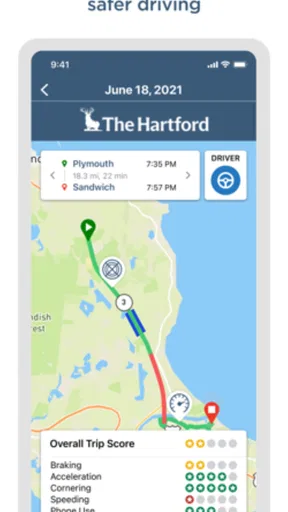
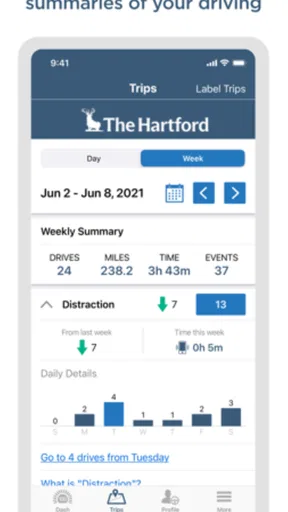
- Trip history makes it easy to review routes, mileage, and driving events.
- Useful for families or policyholders monitoring multiple enrolled drivers.
Limitations of TrueLane by the Hartford
- Discount eligibility and savings vary by state, policy, and driving results.
- Continuous location access can raise privacy and battery-use concerns.
- Harsh braking or acceleration may negatively affect the driving score.
- Requires compatible devices, permissions, and reliable phone connectivity.
- Background tracking may be less accurate when the phone is misplaced in the car.
Similar Picks in This Category
View All
Uber - Request a ride
Uber Technologies, Inc.4.7


inDrive. Rides with fair fares
® SUOL INNOVATIONS LTD4.8

Yandex Go: Taxi Food Delivery
Mikromobilnost LLC Belgrade4.8

Bolt: Request a Ride
Bolt Technology4.8

Rapido: Bike-Taxi, Auto & Cabs
Rapido Bike Taxi4.8
Frequently Asked Questions
What is TrueLane by The Hartford, and how does it work?
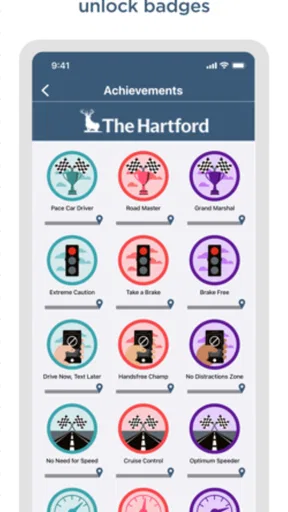
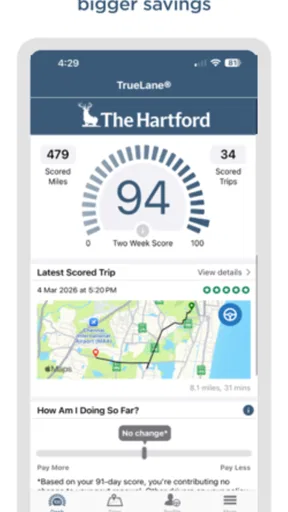
TrueLane is a usage-based driving program from The Hartford that uses a mobile app and smartphone sensors to evaluate driving behavior. After enrollment, the app can monitor factors such as hard braking, rapid acceleration, cornering, speeding, phone distraction, and trip timing. Drivers receive feedback and may qualify for insurance savings depending on their results, policy, location, and program terms.
Does TrueLane by The Hartford lower my car insurance premium?
TrueLane may help eligible drivers receive a discount, but savings are not guaranteed and depend on the driver’s score, state regulations, policy details, and The Hartford’s current program rules. The app is intended to encourage safer driving rather than promise a fixed reduction. Before enrolling, review the offer carefully to understand how the discount is calculated and whether poor results could affect your policy.
What information does the TrueLane app collect from my phone?
To assess driving patterns, TrueLane may use information from your phone’s GPS, motion sensors, trip data, and app activity related to driving. Depending on the version and permissions granted, it may also identify possible phone distraction or distinguish driving from other travel. The app requires appropriate permissions to function, so users should read The Hartford’s privacy policy and program disclosures before sharing data.
Will TrueLane know whether I am the driver or a passenger?
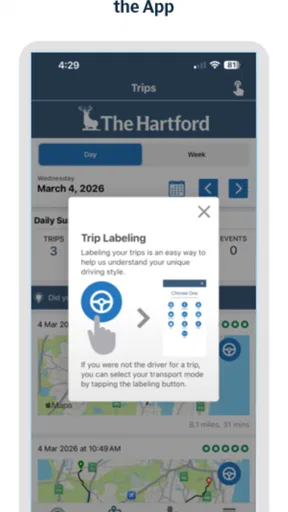
TrueLane attempts to determine whether a recorded trip is connected with your driving, but automatic detection may not always be perfect. Trips taken as a passenger, on public transportation, or in another vehicle can sometimes be identified incorrectly. The app may provide tools to review or classify trips, although available options can vary. Check recorded journeys regularly and correct inaccurate information when the program allows it.
What phone and permissions are required to use TrueLane?
TrueLane generally requires a compatible Android or iPhone, an active mobile connection, location services, motion or activity access, and permission for the app to operate in the background. Battery optimization settings may interfere with trip recording, so some users may need to adjust them. Availability and technical requirements can change by device, operating system, and state; confirm the latest requirements in the official app listing before downloading.
